
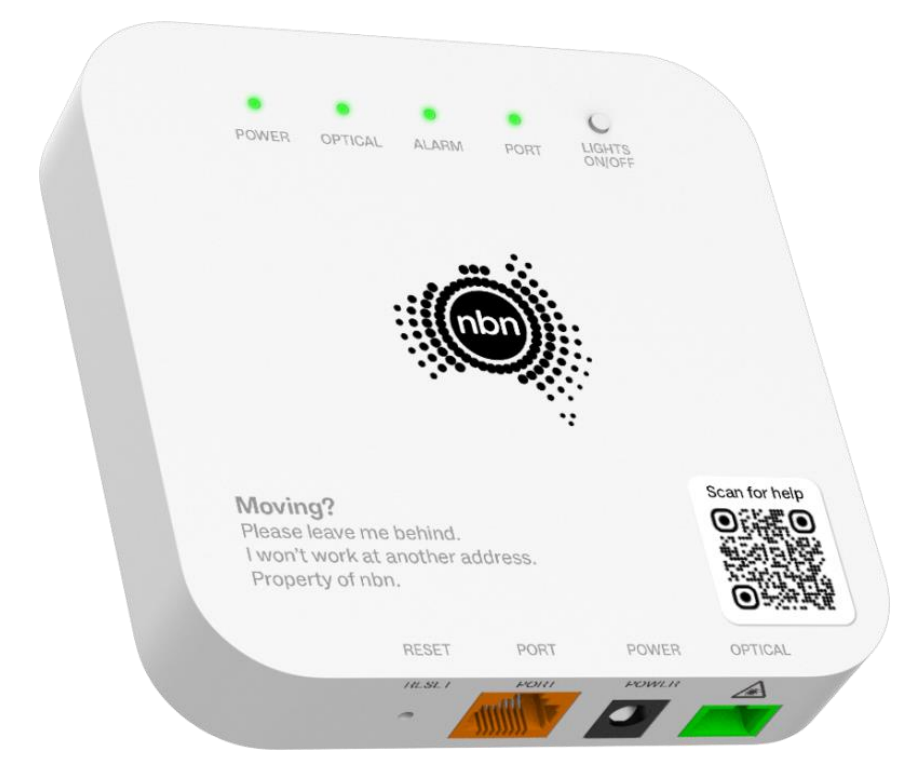
FIBRE TO THE PREMISES
FTTP connection box
Your box may be a newer one-port model or an older four-port model. The wording is similar: look for Power, Optical, Alarm and the active Port or UNI-D light.

FIXED WIRELESS
Fixed Wireless connection box
This indoor box connects to the nbn antenna outside. Look across the top for the Power, Status, ODU and Signal indicators.
Fixed Wireless photo: Wikimedia Commons.
OLDER FTTP INSTALLATIONS
Is your nbn power supply beeping?
Some older FTTP installations have a separate power supply with a backup battery. As these batteries age, the unit may begin beeping and show a Replace Battery light.
Do I have to replace it?
No. Your nbn service will continue to work while mains power is available. The battery only provides backup power to compatible nbn equipment during a power outage.
What battery do I need?
Ask a battery or electronics retailer for a compatible 12V 7–7.2Ah, six-cell sealed lead-acid battery for an nbn FTTP power supply. Take a photo of your existing battery label with you.
What does the beeping mean?
A beep about every 15 minutes generally means the battery needs replacing. Pressing Alarm Silence may stop the warning temporarily, but it does not repair the battery.
Important during a blackout
The nbn battery does not power your Wi-Fi modem or every phone. Those devices need their own backup power, and services may still be unavailable during an outage.
Before calling Highway
Turn off both your modem and the nbn connection box at the power point for about ten minutes. Turn both back on, wait for the lights to settle, then note exactly what they show.
Call 02 6372 3645